


If your site runs on PHP, the PHP security update released on October 21, 2026 applies to you. It fixes two critical flaws, nicknamed PHP2Shell, that let an attacker run code on a web server without logging in: CVE-2026-109618 and CVE-2026-109619, each rated 9.2 under CVSS 4.0. Update to PHP 8.2.35, 8.3.36, 8.4.27 or 8.5.12, then restart every PHP worker. Attack attempts are already circulating.
Sites on Apache with mod_php face the highest confirmed risk, and this WordPress blog runs on exactly that. The PHP team gave a day’s notice and shipped at 14:00 UTC, and the official Docker image carried the fix by 15:57 UTC. We rebuilt on it the next morning and made one mistake: recreating the WordPress container on the patched image threw away the old container’s log. The clean log we checked afterward covered only the eight hours since the restart. It says nothing about the hours between the release and our rebuild.
Who needs this PHP security update, and which version to install
Any site on an unpatched PHP needs it, whatever runs on top. WordPress, WooCommerce, Laravel and Drupal sites are no exception, and no WordPress or plugin update changes that.
| PHP branch | Vulnerable | Install this or later |
|---|---|---|
| 8.2 | 8.2.34 and older | 8.2.35 |
| 8.3 | 8.3.35 and older | 8.3.36 |
| 8.4 | 8.4.26 and older | 8.4.27 |
| 8.5 | 8.5.11 and older | 8.5.12 |
Stay on your branch. Each one has its own fix, so this is not the week to jump from 8.2 to the newest. PHP 8.1 and older get no official release. The PHP team published minimal source patches for 7.4, 8.0 and 8.1, and some vendors backport fixes, but for most sites on those versions the realistic answer is an upgrade.
Ubuntu, Debian and Red Hat patch PHP while keeping an older version number, which is why Ubuntu 24.04 still reports PHP 8.3.6 after its security updates. On those systems, look up the vendor’s notice for both CVE numbers rather than comparing against the table. FrankenPHP ships PHP inside its own binary, so Laravel apps on Octane with FrankenPHP need a new FrankenPHP build. Appliances and hosted products carry their own PHP too, and the Dutch National Cyber Security Centre keeps a vendor-by-vendor status list for them on GitHub.
On Apache with mod_php, researchers turned both bugs into working code execution. On PHP-FPM, behind Nginx or Apache, code execution is confirmed for CVE-2026-109619 through session upload progress. The memory bug, CVE-2026-109618, is vulnerable there on paper, with no full exploit shown yet. Less is known about the rest. FrankenPHP was not tested but is likely vulnerable to the memory bug, as is LiteSpeed (LSAPI) through application-specific paths, and php.net lists php-cgi as at risk. Step 1 below shows how to tell which one you run.
Our read: mod_php sites should treat this as an emergency, because the memory bug fires before any application code runs. PHP-FPM has a narrower confirmed path, but it works with default settings, so we would not wait for a maintenance window there either. Shared hosting usually runs LiteSpeed or PHP-FPM, which means your host has work to do even if you never log in to a server.
How to check and fix your site, step by step
1. Find the PHP version your website runs
The PHP in your terminal and the PHP serving pages can differ, so check the second one. In WordPress, open Tools, then Site Health, then the Info tab, and look under Server. cPanel and Plesk often show only the branch, like 8.3, so ask your host for the full number.
On your own server:
php -v                                  # command-line PHP
php-fpm8.3 -v                           # PHP-FPM (the name varies: php-fpm, php83-php-fpm)
apachectl -M 2>/dev/null | grep -i php  # prints php_module if Apache runs mod_php
In Docker or Kubernetes, ask the running container, not the Dockerfile:
docker exec <container> php -v
kubectl exec deploy/<app> -- php -v
From outside, you can read the version only if the server announces it:
curl -sI https://example.com | grep -i x-powered-byA missing header proves nothing. Many servers hide it.
2. Save logs, then back up
Save the PHP and web server logs before anything else. In Docker that means before you recreate the container, which is how we lost ours. Then copy the site files and the database, and note the PHP version and extensions you run now.
3. Install the patched release and restart PHP
Distributions and long-term support vendors had the patches early, so your package manager may already have yours. On Debian or Ubuntu:
sudo apt update
apt list --upgradable 2>/dev/null | grep -i php
sudo apt upgrade
On Red Hat, AlmaLinux or Rocky Linux:
sudo dnf upgrade 'php*'A third-party PHP repository may lag behind your distribution, so confirm it has published the new build before you trust the update.
With the official Docker images, a tag like php:8.3-fpm picks up the fix only when you pull it again. This is what we ran for this blog, and what the container reported afterward:
docker compose build --pull
docker compose up -d
docker compose exec wordpress php -v
# PHP 8.3.36 (cli) (built: Oct 21 2026 15:57:18) (NTS)
Workers that are already running keep the vulnerable code in memory until they stop, so the restart is part of the fix, not a formality:
sudo systemctl restart php8.3-fpm   # PHP-FPM; check your service name first
sudo systemctl restart apache2      # mod_php on Debian/Ubuntu (httpd on Red Hat)
In Docker and Kubernetes, replace every container or pod. One old replica left behind keeps the hole open. On shared or managed hosting you can’t install PHP yourself, so send your host the message in the next section.
4. Confirm the fix and turn off session upload progress
Repeat step 1 on every server, pool or replica. Then sign in, submit a form, upload a file and, if you sell online, place a test order. It’s worth running composer audit in the same session, but it checks your PHP packages for advisories and says nothing about the runtime.
The PHP team suggests leaving session upload progress off even after patching, since it is hardly used and hardly tested. We switched it off on this blog the same day. In php.ini:
session.upload_progress.enabled = 0Restart PHP after the edit.
5. Look for attempts and intrusions
An affected version doesn’t mean your site was hacked. It means the door was open, and the logs you saved are where to look for anyone who walked through it. Both attacks lean on memory exhaustion and crashed workers, which leave traces:
grep -c "Allowed memory size of" /var/log/nginx/error.log /var/log/apache2/error.log
grep -E "Segmentation fault|SIGSEGV" /var/log/apache2/error.log /var/log/php8.3-fpm.log
A burst of “Allowed memory size of 134217728 bytes exhausted” errors from one IP address, next to workers dying with signal 11, deserves a close look. Log paths differ by system. Then check for changes nobody on your team made:
wp user list --role=administrator          # WordPress admins you don't recognize
find /var/www -name "*.php" -mtime -3      # PHP files changed in the last 3 days
sudo crontab -l -u www-data                # scheduled jobs added for the web user
Clean results are not proof, and the advisory warns that some failures happen before PHP writes any log line. If you find something real, take the server offline and keep the evidence. Rebuild from a clean source, then change every password and API key it held, such as the database password in wp-config.php or .env.
Can’t update today? Stopgaps, or ask your host
Updating is the only complete fix, the PHP team says. Each of these cuts part of the risk and needs every PHP worker restarted:
session.upload_progress.enabled = 0, the step 4 setting, blocks the confirmed session path.fatal_error_backtraces = 0on PHP 8.5 removes the strongest confirmed trigger.memory_limit = -1, set where applications can’t override it, is the advisory’s main stopgap for CVE-2026-109618 because it removes the predictable cap the attack needs. One heavy request can then eat all the server’s memory, so pair it with request size limits in Nginx or Apache and a container or cgroup memory cap. AvoidRLIMIT_ASandRLIMIT_DATA, which make the bug easier to hit.- Refuse upload requests at the web server if the site or API never accepts forms with files. In Nginx:
if ($content_type ~* "multipart/form-data") {
    return 415;
}
WordPress needs these requests for its media library, so this one is for APIs and static-style sites.
pm.max_requests = 1gives every PHP-FPM request a fresh worker, so nothing carries over. Expect a performance cost.
A web application firewall or Cloudflare won’t reliably stop these attacks. The PHP team lists request size limits at the proxy as partial hardening against the memory bug and says they do not replace the update. CVE-2026-109619 can start from a fatal error your own application throws, which a firewall never sees.
If a host runs your PHP, ask it. This message can go as it stands:
Hello, PHP has released fixes for CVE-2026-109618 and CVE-2026-109619. Please confirm that the PHP runtime serving my site includes both fixes, either as the patched release for its branch or as a vendor package that backports them. Please also confirm that all PHP workers were restarted afterward. If the update is delayed, please tell me when to expect it and whether session upload progress can be disabled for my account in the meantime.
What went wrong inside PHP
CVE-2026-109618 starts with a limit every request has: a memory cap, the memory_limit setting, 128 MB by default. When a request hit it, older PHP stopped mid-step and jumped straight to cleanup. If it was halfway through setting up a piece of memory at that instant, cleanup later read the half-built data as if it were valid.
An attacker can reach that cap on purpose with what looks like an ordinary file upload. The advisory gives three tricks: one form part carrying thousands of headers, empty file fields that pile up without counting toward max_file_uploads, and a body with no usable length that slips past post_max_size. None of them breaks the size limits you set.
PHP reads an upload body for any address it serves, before your code starts. On mod_php the crash and the bad cleanup both happen before WordPress loads a single file, so the attacker needs no form, no plugin and no account. The researchers’ exploit works with default memory and input limits. The fix stops a request at a safe point instead, and kills the process outright if memory climbs past a second, higher ceiling.
The second bug lives between requests. A PHP worker serves request after request, and a cleanup step clears the records that point into the finished request’s memory. A fatal error, such as running out of memory, hitting the time limit or a failed require, can skip that step. The next request on the same worker then touches freed memory before PHP has finished starting up. That is CVE-2026-109619, and two paths from it to code execution are confirmed. Session upload progress, on by default and active even if your code never calls session_start(), worked against both mod_php and PHP-FPM. The fatal_error_backtraces setting gave the strongest result against mod_php.
Both requests have to land on the same worker. Many workers lower the odds of each attempt, and an attacker can simply send more.
Is CVE-2026-109618 being exploited?
Attackers are trying it. Cloudflare says the flaws leaked before the official release date, and that it saw attack traffic aimed at its customers, with payloads reworked to slip past its new rules. Amazon’s threat intelligence team says its MadPot honeypots, decoy servers that exist to draw attacks, caught PHP2Shell exploitation before the details were public. None of these sources reports a confirmed break-in at a real site. CISA’s Known Exploited Vulnerabilities catalog, version 2026.10.21, lists neither CVE, and that catalog can trail the first attacks by days. Read its silence as nothing proven yet, not as safe.
Last verified October 22, 2026, 16:45 UTC.
Binance founder Changpeng Zhao warned his followers about the two flaws within hours of the release. By the next afternoon his post had passed 1.3 million views.
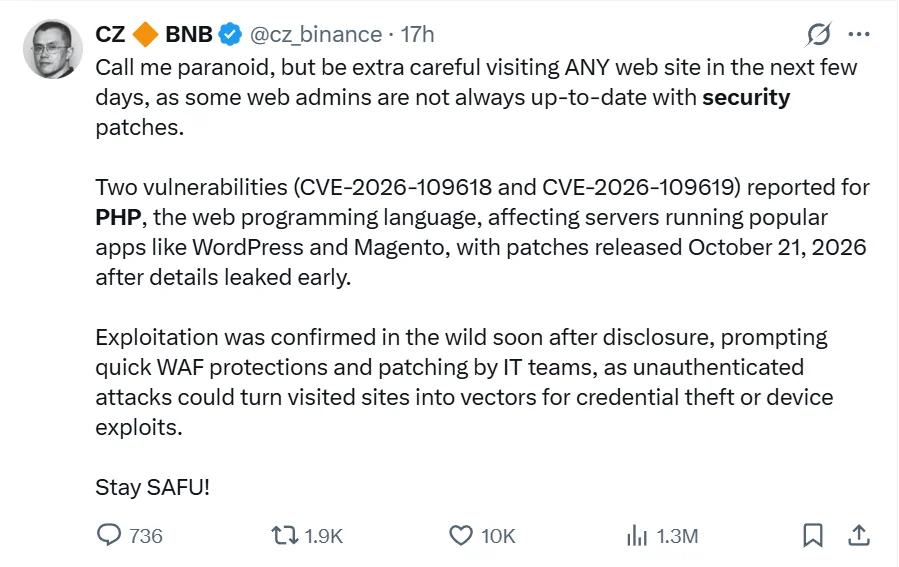
An earlier version of this section was too quick to doubt him. We wrote that we had found no source for “after details leaked early”. Cloudflare’s write-up says exactly that, so we corrected it. “Exploitation was confirmed in the wild” holds for attempts: attack traffic and honeypot hits show working attacks in circulation. It does not show that any particular site was taken over. The PHP advisories use “confirmed” in a narrower sense still, for the mod_php attack the researchers built and ran themselves.
A second viral post counted security fixes from six projects “in a single day”. Five of the six hold up, and NGINX’s five shipped a week earlier. Our October 2026 security releases roundup checks each one against its project’s records and lists what Node.js, Go and GitLab users should install.
None of this is a reason to stop visiting websites. These bugs let an attacker take over a web server, not the computer of someone reading the site. Visitors face risk only later, if a hijacked site starts serving malware or a fake sign-in page. A familiar site that suddenly asks you to log in again or download a file deserves suspicion.
Sources
The commands and the php -v output come from this blog’s own server. Everything else comes from the pages below.
- PHP security advisory GHSA-w8hw-w9fx-j79w, “RCE via OOM corruption” (CVE-2026-109618)
- PHP security advisory GHSA-6wmf-4rv5-p3rp, “RCE via stale global state” (CVE-2026-109619)
- php.net, “Upcoming Critical PHP Security Release” (October 20, 2026) and the release news of October 21
- Cloudflare, “Cloudflare deploys protections against php2shell vulnerability” (October 21, 2026)
- Amazon Threat Intelligence, “Amazon Threat Intelligence identifies PHP2Shell exploitation prior to public disclosure in MadPot”
- CISA Known Exploited Vulnerabilities catalog, data on GitHub, version 2026.10.21
- Dutch National Cyber Security Centre, PHP2Shell vendor status list
- Can You Switch Browsers Without Losing Bookmarks, Passwords, and History?

- AI Browser vs Browser Extension: Which Should You Use?

- Are AI Browsers Safe for Online Banking, Shopping, and Personal Accounts?

- Can AI Fill Out Online Forms for You? What Works and What Needs Approval

- Is an AI Browser Worth Switching To? What Everyday Users Should Know

- How Developers Can Connect Coding Agents to a Real Browser

- How Minda Syncs Browser Data Across Computers

- How to Prepare AI-Assisted Research Reports With Verifiable Sources

- Minda Free vs Pro vs Max: Features, Credits, and Plans

- How to Organize Research With Browser Notes and Highlights

- Claude Fable 5.5: The Azure Leak, the Viral Demos and What Is Confirmed

- Minda Privacy Explained: What Stays on Your Computer?

- How AI Agents Can Help SEO Teams With Research and Reporting

- How Minda Combines AI Chat, Research, and Browser Actions

- How to Use Your Own AI Models and API Keys in Minda

- How to Automate Website Monitoring and Routine Checks

- October 2026 Security Releases: Node.js, Go, GitLab, NGINX and eMudhra, Checked
- PHP Security Update, October 2026: CVE-2026-109618 and CVE-2026-109619 Explained
- How to Extract Website Data Into CSV or Excel Without Copying Manually

- Browser AI Agents vs RPA: Which Fits Everyday Work?

- How to Get Started With Minda on Windows, macOS, and Linux

- How AI Agents Help Digital Agencies Manage Multiple Clients

- How Minda Handles AI Actions That Require Your Approval

- How to Use AI for Web Research Without Losing Track of Sources

- How Minda Workspaces Keep Your Accounts Separate

- AI Agents for Freelancers: Practical Ways to Reduce Repetitive Work

- How to Manage Multiple Accounts Without Constantly Switching Logins

- How to Automate Repetitive Browser Tasks With an AI Agent

- Desktop AI Agent Platform: Features, Real Workflows, and How to Choose

- What Is a Super Intelligent Agent?

- What Is a Super Intelligent Browser?

- AI Agent Apps: What Can They Actually Do?

- Can Minda Use Your Computer Like a Human? A Simple Guide for Everyday Users

- Can an AI Agent Plan Your Entire Trip? How Minda Helps From Research to Booking

- Can Minda Manage Your Social Media for You? From Voice Idea to Multi-Platform Posting

- Can an AI Agent Edit Your Website? How Minda Works With WordPress, Shopify and Static Sites

- What Can Minda Do? 5 Core AI Capabilities Explained

- What Is a Super Intelligent Platform?

- AI Agent vs AI Assistant: What Is the Difference?

- AI Browser vs Traditional Browser: What Is the Difference?

- What Is an AI Agent? How AI Agents Complete Tasks for You

- What Is a Desktop AI Agent? A Simple Guide to AI That Works on Your Computer

- What Is an AI Browser? How AI Browsers Work in 2026