

Can You Switch Browsers Without Losing Bookmarks, Passwords, and History?
Switching browsers? Learn how to protect and transfer bookmarks, passwords, history, tabs, and extensions—and what to check before changing your default browser.

AI Browser vs Browser Extension: Which Should You Use?
Should you install an AI browser or add an AI extension to Chrome? Compare setup, permissions, research tools, and everyday workflows.

Are AI Browsers Safe for Online Banking, Shopping, and Personal Accounts?
Are AI browsers safe for banking, shopping, and personal accounts? Learn how to evaluate permissions, payment approvals, privacy, and practical risks.

Can AI Fill Out Online Forms for You? What Works and What Needs Approval
Can AI fill out online forms for you? Learn what browser agents can automate, where they make mistakes, and which steps deserve your approval.

Is an AI Browser Worth Switching To? What Everyday Users Should Know
Is an AI browser worth switching to? Compare everyday benefits, privacy trade-offs, limitations, and when a regular browser is still the smarter choice.

How Developers Can Connect Coding Agents to a Real Browser
A browser MCP for coding agents is a local bridge that lets an agent such as Claude Code, Codex or Cursor open, read, screenshot, click and type in a real Chromium session. It no longer has to guess from source code. The agent sends structured...

How Minda Syncs Browser Data Across Computers
How Minda syncs browser data across your computers Minda browser sync starts as soon as you sign in to your Minda account. Your bookmarks, history, saved passwords, notes, highlights, skills, AI chats, workspaces and browser settings then show up on every computer signed in to...

How to Prepare AI-Assisted Research Reports With Verifiable Sources
AI research reports with citations readers can check AI research reports with citations hold up when every material claim points to a page someone opened and can show. Use AI to gather, compare, sort and draft. Keep a record of each source’s address, its access...

Minda Free vs Pro vs Max: Features, Credits, and Plans
How Minda pricing plans differ Minda pricing plans come in three tiers, Free, Pro and Max, and each one includes every Minda function. The AI agent, chat, deep research, workspaces, automations and sync are on all three. What changes is how much hosted AI comes...

How to Organize Research With Browser Notes and Highlights
Browser research notes you can find again Browser research notes earn their keep when each saved highlight records what the page said, why it matters to your project, and where it lives. Capture the exact passage, add a sentence in your own words, and keep...

Claude Fable 5.5: The Azure Leak, the Viral Demos and What Is Confirmed
Claude Fable 5.5 has not launched. We traced the LiteLLM Azure leak, checked Anthropic's launch posts and explain how the viral code-to-MP4 demos work.

Minda Privacy Explained: What Stays on Your Computer?
Minda privacy: what stays put and what leaves Minda privacy comes down to where each request goes. Ad and harmful-site lists are matched on your computer, and an Ollama model answers there too. Data leaves when sync runs after you sign in, when a chat...

How AI Agents Can Help SEO Teams With Research and Reporting
Where AI agents for SEO save time AI agents for SEO earn their place in the slow middle of research: opening sources, comparing pages, pulling details into notes and drafting the first version of a report. They do not produce rankings. Give an agent a...

How Minda Combines AI Chat, Research, and Browser Actions
The Minda AI workflow: from a question to a reviewed result A Minda AI workflow runs in one desktop app. You shape the task in the AI chat, Minda researches it from pages it has read and cites them, and its agent then does the...

How to Use Your Own AI Models and API Keys in Minda
Bring Your Own Key: How Minda AI API Keys Work Minda AI API keys are the keys you bring from your own AI provider accounts. Paste a key from OpenAI, Claude, Gemini, DeepSeek, OpenRouter or Qwen, or point Minda at Ollama on your computer, and...

How to Automate Website Monitoring and Routine Checks
What automated website monitoring should answer Automated website monitoring pays off when each check answers one question you already ask by hand. Is the page up? Did this price, policy line or stock row change? Does the signup form still submit? Write down the expected...
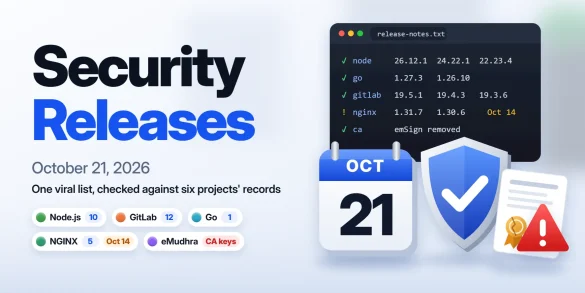
October 2026 Security Releases: Node.js, Go, GitLab, NGINX and eMudhra, Checked
We checked a viral list of October 2026 security releases. Node.js, Go, GitLab, PHP and eMudhra hold up. NGINX's five fixes shipped a week earlier.

PHP Security Update, October 2026: CVE-2026-109618 and CVE-2026-109619 Explained
PHP fixed two critical RCE flaws, CVE-2026-109618 and CVE-2026-109619, on October 21, 2026. See if you are affected, which version to install and how to patch.
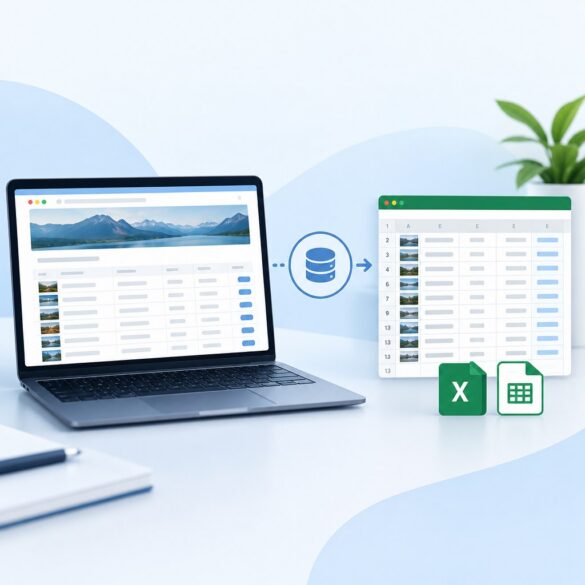
How to Extract Website Data Into CSV or Excel Without Copying Manually
What it takes to extract website data to Excel To extract website data to Excel, pick the fields that repeat on the page, such as name, price, link and category, and let a page-data tool turn each item into a row. Check the preview, then...

Browser AI Agents vs RPA: Which Fits Everyday Work?
Browser AI agent vs RPA: match the method to the work In the browser AI agent vs RPA choice, the deciding factor is how much the work varies. A browser AI agent fits everyday tasks that change a little each time, because it reads the...

How to Get Started With Minda on Windows, macOS, and Linux
Minda desktop app download: pick the file for your system The Minda desktop app download comes in three families: a Setup .exe or a portable .zip for Windows, a universal .dmg or .zip for macOS, and .deb, .rpm or AppImage packages for Linux. Get the...

How AI Agents Help Digital Agencies Manage Multiple Clients
AI agents for agencies: client work without crossed accounts AI agents for agencies take over the repetitive browser work that piles up across client accounts: checking competitors, gathering campaign evidence, filling routine forms. In Minda each client gets a workspace with its own sign-ins, the...

How Minda Handles AI Actions That Require Your Approval
Minda AI agent safety: what waits for your OK Minda AI agent safety starts with one default rule. The agent clicks, types and fills forms on its own in hidden tabs. It stops for your OK before any press that pays, buys or places an...

How to Use AI for Web Research Without Losing Track of Sources
AI web research starts with a source trail AI web research goes faster when the model finds and summarizes candidate pages, but every claim you keep still needs a page you have opened yourself. Define the question, let the AI suggest sources, read the pages...

How Minda Workspaces Keep Your Accounts Separate
Minda workspaces: one browser space per account Minda workspaces let you stay signed in to several accounts on the same website at once. Each workspace is its own Chromium browser space, with its own cookies, sign-ins and saved site data. A site you open in...

AI Agents for Freelancers: Practical Ways to Reduce Repetitive Work
Where AI agents for freelancers save the most time AI agents for freelancers cut the busywork around client work: researching sources, turning kickoff notes into briefs, drafting first versions and updating routine records in the browser. The gain is a dependable first pass. Your hours...

How to Manage Multiple Accounts Without Constantly Switching Logins
To manage multiple accounts in one browser without logging out and back in, give each account its own cookie store: a browser profile, or a workspace with its own cookies and sign-ins. Then two Gmail or two Shopify accounts stay signed in at once, each...

How to Automate Repetitive Browser Tasks With an AI Agent
AI browser automation: describe the outcome, not the clicks AI browser automation means an agent reads a page, decides what belongs in each field, clicks through the routine steps and reports what it finished. You give it a goal, limits and a stopping point instead...

Desktop AI Agent Platform: Features, Real Workflows, and How to Choose
Explore what makes a desktop AI agent platform useful: browser workspaces, task execution, research, approvals, and practical workflows with Minda.

What Is a Super Intelligent Agent?
A Super Intelligent Agent is an AI agent designed to understand goals, use context, work across tools, and complete multi-step tasks with human oversight. Learn what the term means and how it fits into the broader Minda platform direction.

What Is a Super Intelligent Browser?
A Super Intelligent Browser goes beyond ordinary browsing by combining AI understanding, agent capabilities, research, and task execution in the browser. Learn what the term means and how it fits into the wider desktop AI agent platform direction.

AI Agent Apps: What Can They Actually Do?
AI agent apps can research, plan, navigate, organize, and complete multi-step tasks with approved tools and human oversight. Learn what they can actually do, where they help most, and what to evaluate before using one.
- Can You Switch Browsers Without Losing Bookmarks, Passwords, and History?

- AI Browser vs Browser Extension: Which Should You Use?

- Are AI Browsers Safe for Online Banking, Shopping, and Personal Accounts?

- Can AI Fill Out Online Forms for You? What Works and What Needs Approval

- Is an AI Browser Worth Switching To? What Everyday Users Should Know

- How Developers Can Connect Coding Agents to a Real Browser

- How Minda Syncs Browser Data Across Computers

- How to Prepare AI-Assisted Research Reports With Verifiable Sources

- Minda Free vs Pro vs Max: Features, Credits, and Plans

- How to Organize Research With Browser Notes and Highlights

- Claude Fable 5.5: The Azure Leak, the Viral Demos and What Is Confirmed

- Minda Privacy Explained: What Stays on Your Computer?

- How AI Agents Can Help SEO Teams With Research and Reporting

- How Minda Combines AI Chat, Research, and Browser Actions

- How to Use Your Own AI Models and API Keys in Minda

- How to Automate Website Monitoring and Routine Checks

- October 2026 Security Releases: Node.js, Go, GitLab, NGINX and eMudhra, Checked

- PHP Security Update, October 2026: CVE-2026-109618 and CVE-2026-109619 Explained
- How to Extract Website Data Into CSV or Excel Without Copying Manually

- Browser AI Agents vs RPA: Which Fits Everyday Work?

- How to Get Started With Minda on Windows, macOS, and Linux

- How AI Agents Help Digital Agencies Manage Multiple Clients

- How Minda Handles AI Actions That Require Your Approval

- How to Use AI for Web Research Without Losing Track of Sources

- How Minda Workspaces Keep Your Accounts Separate

- AI Agents for Freelancers: Practical Ways to Reduce Repetitive Work

- How to Manage Multiple Accounts Without Constantly Switching Logins

- How to Automate Repetitive Browser Tasks With an AI Agent

- Desktop AI Agent Platform: Features, Real Workflows, and How to Choose

- What Is a Super Intelligent Agent?

- What Is a Super Intelligent Browser?

- AI Agent Apps: What Can They Actually Do?

- Can Minda Use Your Computer Like a Human? A Simple Guide for Everyday Users

- Can an AI Agent Plan Your Entire Trip? How Minda Helps From Research to Booking

- Can Minda Manage Your Social Media for You? From Voice Idea to Multi-Platform Posting

- Can an AI Agent Edit Your Website? How Minda Works With WordPress, Shopify and Static Sites

- What Can Minda Do? 5 Core AI Capabilities Explained

- What Is a Super Intelligent Platform?

- AI Agent vs AI Assistant: What Is the Difference?

- AI Browser vs Traditional Browser: What Is the Difference?

- What Is an AI Agent? How AI Agents Complete Tasks for You

- What Is a Desktop AI Agent? A Simple Guide to AI That Works on Your Computer

- What Is an AI Browser? How AI Browsers Work in 2026