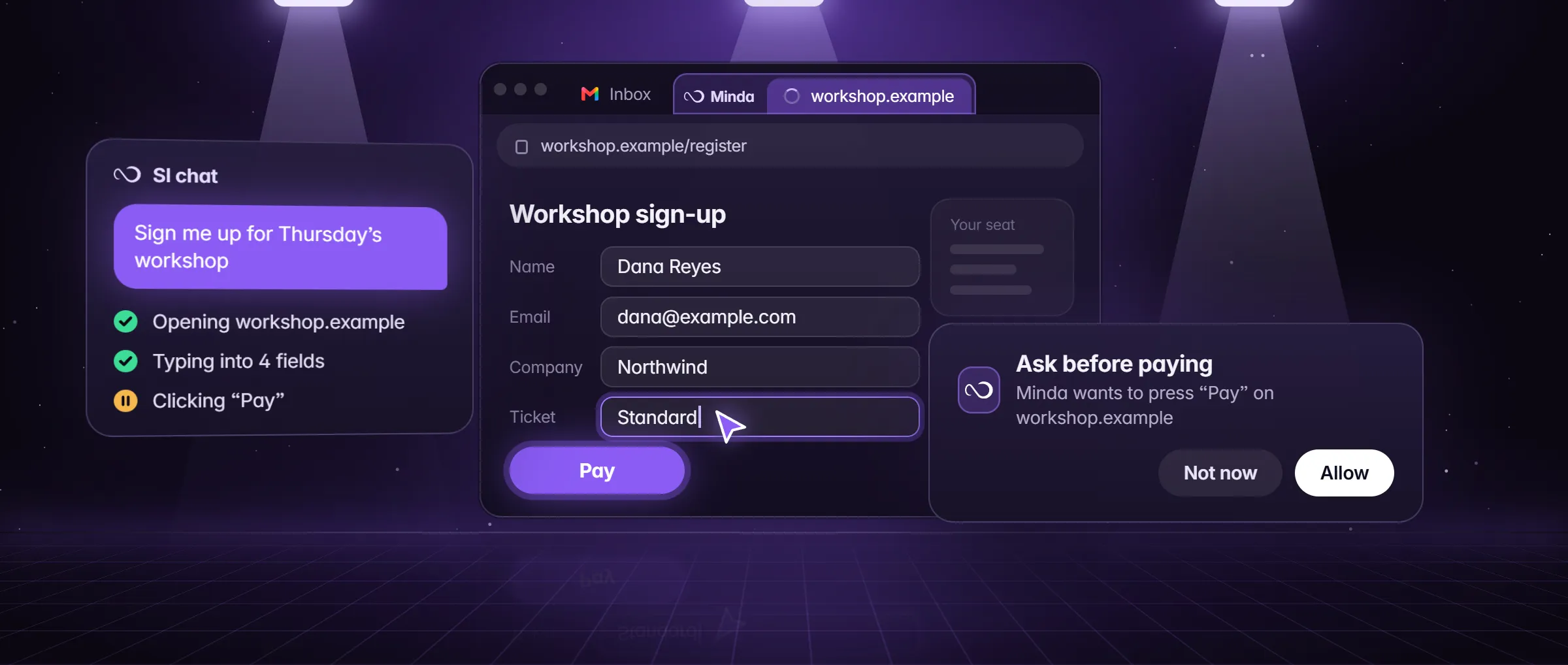
What is a personal AI agent?
A personal AI agent is an AI that does things for one person, in that person’s own accounts, the way they would do them. Ask it to compare three apartment listings in Denver, find two dentists in Austin open on Saturdays, or collect last month’s invoices into a spreadsheet, and it opens the pages, reads them, clicks, types and fills the forms, then tells you what it did and what it could not do. A chat would answer with steps; the agent takes them.
Two words carry the meaning. Personal: it works for you, with what it knows about you and the limits you set, in the accounts you already use. Agent: it acts, with tools to open, read, click and type, and it picks the next step from what it sees. Minda Super Intelligence is built around that idea: the personal AI agent app for your computer, whose SI agent works in a built-in browser with your own sign-ins. How an agent works on a page is in what is an AI agent; this page is about the personal part.
How is it different from a chat assistant or a cloud agent?
Three kinds of AI are offered for personal use, and they differ in what they may touch and where they do it. A chat assistant answers; a cloud agent acts, but on a computer someone else runs; a personal agent acts on your own computer, in the accounts that are already open there.
| Question | Chat assistant | Cloud agent | Personal agent on your computer |
|---|---|---|---|
| What it does | Answers in words; you do the clicking | Acts on pages | Acts on pages and, after your OK, on your computer |
| Where it acts | Nowhere: it only answers | On a computer someone else runs | On your own computer |
| Whose sign-ins it uses | None | The ones you give it again on its computer | The ones already in your workspaces |
What can a personal agent do in your accounts?
The jobs worth giving it are the ones you now do by hand across several tabs. A few Minda Super Intelligence does today:
- Research and compare: read many pages and set them side by side, or run a deep research report that cites only what was read, saved as PDF, Word or Slides.
- Fill and file: fill a form field by field, pick from menus, follow next pages, and put what it finds in a note or an Excel file.
- Work across accounts: name a workspace ("in the Shop B workspace") or say "every account", and helpers take one account each, side by side.
- Keep watch: a schedule from every 15 minutes to a cron line of your own, or once at a time you pick ("in 10 minutes, check this page and tell me"), while Minda is open. A reminder such as "remind me at 3:30 to call Bob" uses no AI and no credits.
- Draft replies in your voice: up to 3 reply drafts for a chat message among your notification cards. It never presses Send: you copy one, or it types one into the empty message box for you to send.
- Call for you: on WhatsApp, Telegram, Messenger, Instagram and TikTok web calls it says first that it is an AI calling for you, works through your brief and never agrees to a payment or a commitment.
How does it get to know you?
A personal agent is only as useful as what it knows about you, and you should decide what that is. The SI agent’s memory suggests and you approve: it proposes facts from your chats, your browsing habits (the sites you visit most, read on your computer, never a page title or path) or a file you import, and nothing is saved until you press Save. It keeps up to 500 memories, and each one is either Cloud, synced with your account, or This device only, which never syncs. Settings → Memory shows both lists.
- Bring what another AI knows. Settings → Memory → Bring from another AI gives you a prompt to paste into ChatGPT, Claude or Gemini; you paste its answer back, it is read on your computer, and each fact is kept only if you tick it.
- Teach it a task once. Settings → AI agent → Agents starts with Teach Minda a task: record a workflow with your own clicks and typing (secret fields are never read), and it is saved as an agent that replays the steps without a model request.
- Give it a standing role. A saved agent holds your instructions, a task, a "Done when" line, the sites it may use, a model and step and time limits; a schedule or a saved agent keeps the workspace it was made in.
- A morning brief. One switch in the Tasks panel makes a daily 8:00 digest of your unread notifications, connected mail and calendar and memory, ending with what is done and what needs you.
What does it ask you first?
You pick how far it goes, task by task. Minda’s site names four levels, each made of real settings: Advise (it reads, compares and drafts, and you press every button), Review (it does the work, and Submit, Send, Post and Publish wait for your OK), Auto (the default: it works on its own in hidden tabs, and paying waits for your OK) and Autopilot (a schedule with Ask before paying turned off, so the run pays too, with every step in the action log). Human with AI walks one task through all four.
Underneath, the guards are the same for every run. Ask before paying is on by default. Leave it for my review holds the finishing press when your words ask for a draft. Careful, off by default, holds a step that sends, posts, deletes, uploads, types a password or gives access. A login, a CAPTCHA, an age check or a paywall is handed to you, and Stop ends a run at any time. A sensible rule of thumb: leave Ask before paying on for any task you have not yet watched run once.
Where does your data go?
A personal agent reads personal things, so where they go matters more than with a chat. In Minda, an AI request goes to the provider you picked: Minda’s hosted models, your own OpenAI, Claude, Gemini, DeepSeek, OpenRouter or Qwen key, or Ollama on your computer. The AI activity log records provider, model, host, character counts and page titles for each request, never the words, and the action log records the tool, the site and the result of each step, never page text or typed text.
Keep SI on this computer makes Minda refuse every cloud provider, its own hosted models, cloud speech and the agent’s outside-service tools before anything is sent. With sync on, each item is sealed on your computer with AES-256-GCM before it leaves; by default Minda’s server holds the key wrapped with its own secret, so it can read what syncs, and with your own passphrase of at least 10 characters it cannot. A memory set to This device only never syncs at all. What leaves your computer lists every request, feature by feature.
What does a personal AI agent cost?
In Minda the agent is on every plan with no daily limit, and the plans differ by credits, never by functions. Its turns are AI requests: on Minda’s hosted models they use Minda AI credits, 100 a month and 30 free everyday replies a day on Free, 2,000 credits a month on Pro; with your own key, or Ollama on your computer, they cost no credits at all. Reminders and plain scrapes use no AI and no credits.
A long job costs more turns than a short one, so a task you repeat is worth making cheaper: a recorded workflow replays without a model request, and a scrape task reads values with no AI at all. How Minda AI credits work has the arithmetic.
What is a good first job to give it?
- Pick a job you already do by hand, with an end you can check: "find two dentists in Austin open on Saturdays, with their phone numbers and the insurance they take, in a table".
- Say where to work, such as "in my Personal workspace", so it uses that workspace’s sign-ins.
- Add "for my review" if the job ends in a send or a booking, so the last press waits for you.
- Open its tab to watch, follow the live checklist, and press Stop if a step looks wrong.
- Read the action log afterwards, and save a memory it suggests only if it is right.
- If you will want the job again, make it a saved agent or a schedule.
Limits
- It acts on pages and, after your OK, on your computer as far as the Computer level allows; a login, a CAPTCHA, an age check or a paywall is left to you.
- Its turns are AI requests: Minda AI credits on hosted models (100 a month on Free), or none with your own key or Ollama.
- Schedules run only while Minda is open on that computer; cloud automations run while it is off, but read public pages and APIs only.
- Minda Super Intelligence for Windows 10 and 11 (64-bit) is coming soon; macOS and Linux builds are not published yet.
Questions
What is a personal AI agent?
An AI that acts for one person in their own accounts: it opens pages, clicks, types and fills forms, then reports what it did. In Minda Super Intelligence the SI agent does this on your computer, with the sign-ins of your workspaces, and stops for your OK before anything that pays.
Do I need to build a personal AI agent?
No. In Minda the SI agent is ready in the chat: say what you want in plain words. For a standing role, write a saved agent (instructions, a task, a Done when line, sites and limits), or record a task once with Teach Minda a task. Neither needs code.
Is there a good AI agent for personal use?
Judge one by your own job: does it act in your accounts, ask before it pays, log what it sent, and let you keep requests off the cloud? Minda’s SI agent does all four on every plan, Free included, with 100 Minda AI credits a month.
Can a personal AI agent spend my money?
Not without you while Ask before paying is on, the default: a press that pays, buys or places an order, and card or bank details typed, wait for your OK. Turn it off, as on Autopilot, and a scheduled run pays too, with each step in the action log.
Does it remember things about me?
Only what you approve. The SI agent suggests memories from your chats, your browsing habits or an imported file, and nothing is saved until you press Save. Each memory is Cloud, synced with your account, or This device only; Settings → Memory lists both.
Sources
- minda-facts.json: entity (Human with AI, you multiplied)
docs/marketing/minda-facts.json#entity - minda-facts.json: ai-agent
docs/marketing/minda-facts.json#ai-agent - minda-facts.json: private-ai
docs/marketing/minda-facts.json#private-ai - minda-facts.json: minda-ai
docs/marketing/minda-facts.json#minda-ai - minda-facts.json: scheduled-tasks
docs/marketing/minda-facts.json#scheduled-tasks - minda-facts.json: notifications
docs/marketing/minda-facts.json#notifications - minda-facts.json: deep-research
docs/marketing/minda-facts.json#deep-research - minda-facts.json: import and sync
docs/marketing/minda-facts.json#import - The four levels and the real controls behind them
tools/website/hub/together.mjs - Saved agents, AI memory, the morning brief and Bring your AI: Key Design Decisions 100, 156, 191 and 223
docs/project-knowledge.md - What Minda keeps and sends: sections 1, 2 and 3
docs/privacy.md