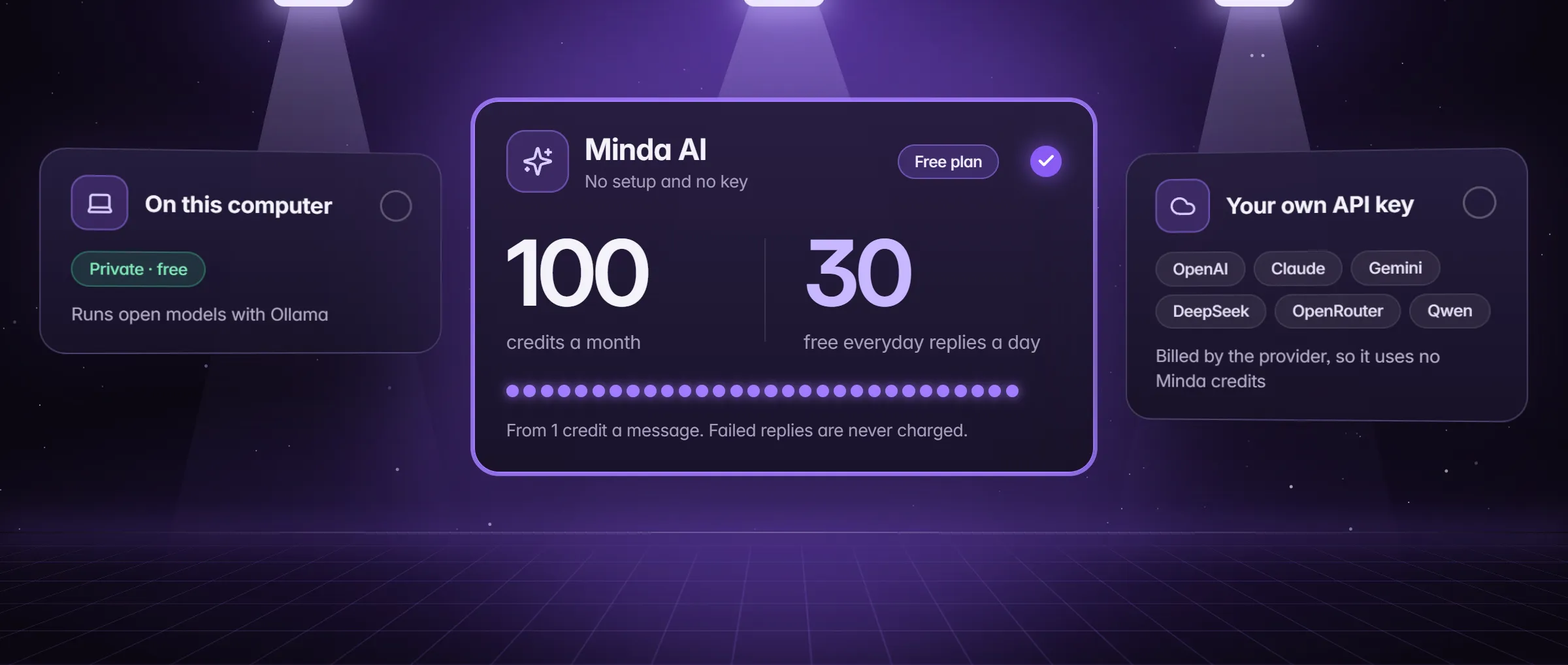
What does "bring your own API key" mean in Minda?
It means Minda Super Intelligence sends your AI requests to your own account with an AI provider, instead of to Minda’s hosted models. An API key is the secret that provider gives you to call its models from an app. With it saved, Minda charges no credits for that model’s replies: the provider bills you, on your own plan and at its own rates.
It works on every plan, Free included, and it is not a separate tier: the AI chat, compare mode and the SI agent all run on the model you pick, and the agent has no daily limit on any plan. Its turns are AI requests: paid in Minda AI credits on Minda’s hosted models, and by your provider on your own key. If you would rather not have a provider at all, Ollama runs open models on your computer with no key: run SI on your computer covers that path.
Which providers can you use?
Six cloud providers take a key, and Ollama needs none. Each row in Settings → AI says what its key is for.
| Provider | What the key gives | Where the words go |
|---|---|---|
| OpenAI | GPT models; the key also powers the Minda voice assistant, meeting notes and pictures in the chat | OpenAI |
| Anthropic | Claude models | Anthropic |
| Google Gemini | Gemini models; the row notes that Google AI Studio offers a free tier | |
| DeepSeek | DeepSeek Chat and Reasoner | DeepSeek |
| OpenRouter | One key for hundreds of models: GPT, Claude, Gemini, DeepSeek, Qwen, Kimi, GLM and more | OpenRouter, then the model’s vendor |
| Alibaba Qwen | Qwen models from Alibaba Cloud Model Studio, international region | Alibaba Cloud Model Studio |
| Ollama (no key) | The open models you pull onto this computer | This computer |
How do you add your key?
- Get a key from the provider. Each row in Settings → AI has a Get a key link to that provider’s page. Treat the key like a password: anyone holding it can spend on your provider account.
- In Minda, open Settings → AI and scroll to Cloud providers; the model menu next to Send also has an Add API key row. Each provider has a row with its status: No key, until you save one.
- Paste the key into that provider’s field and press Save. The status turns to Key saved, and the field never shows the key again; paste a new one there to replace it.
- In the AI chat, open the model menu next to Send and pick a model from that provider. The menu lists only models that are ready to use.
- Send a message. Under the reply, the cost line reads 0 credits; hover it and it says who pays, for example "Billed to your OpenAI key, so it costs no Minda AI credits".
What runs on your key, and what still uses credits?
Whatever you run on the model you picked is billed to its provider. A few parts of Minda run on Minda’s own servers or in places your key cannot reach, and those stay on Minda AI credits.
- On your key: the AI chat, comparing 2 or 3 models side by side on one question, and the context you pull in with @tabs, @bookmarks, @history, notes, files and video transcripts.
- On your key: the SI agent’s turns in the chat and in background tasks, and a chatbot’s automatic replies. A scheduled AI task uses the provider of the model picked when it was scheduled.
- On an OpenAI key: the Minda voice assistant’s speech, meeting notes and pictures in the AI chat; without one, these use Minda AI credits (meeting notes can also use Windows’ own recognizer for free).
- Still credits: any Minda AI model you pick, and the Ask Minda AI steps of cloud automations, which run on Minda’s server while your computer is off.
- Still credits: Minda SI for Chrome, which takes no own keys or Ollama; calls where the AI talks for you; and Minda Files’ AI tools on the web, such as Translate PDF.
Where does the key live, and where do your words go?
- Encrypted on that computer. Minda stores each key encrypted by your operating system, one per provider, and never as plain text. On a system with no encryption, saving the key is refused.
- Never shown again, never synced. Settings shows only that a key is saved. Sync never copies API keys, so you add your key on each computer; a
.mindabackup does carry it, sealed with the password you give the backup. - Your words go straight to that provider. With your own key, the question, the chat so far, the pages, files, notes and pictures you add, your workspace names while the agent may open pages, and what its tools read go to that provider, not through Minda’s server.
- Your IP shows to the provider. Hide my IP covers browsing only; AI providers are reached directly.
- A log without the words. The AI activity log lists each request’s provider, model, host, character counts and page titles, never the words themselves.
Own key, Ollama or Minda AI credits: which fits?
All three work on every plan, and you can switch per chat in the model menu. The difference is set-up, who bills you and where the words go.
| What differs | Your own key | Ollama | Minda AI credits |
|---|---|---|---|
| Set-up | A key from the provider | Install Ollama and pull a model | None: sign in |
| Who bills you | The provider | No one | Your plan’s credits, then packs |
| Where the words go | That provider | This computer | Minda’s server and the model’s vendor |
| With Keep SI on this computer | Off | The only choice | Off |
| In Minda SI for Chrome | No | No | Yes |
| A task’s credit budget | Does not apply | Does not apply | Stops the task before it passes |
What happens when your key stops working?
- Settings tells you. Opening Settings → AI checks the saved keys again. A rejected key shows "The provider rejected this API key."; an empty balance shows "Out of credit or rate-limited: check this key’s plan and billing."
- The menu hides what cannot answer. A model whose key fails leaves the model menu until the key works again.
- A run can switch models. If a request fails on its model, quota, key, availability or time, the run moves to another model that is ready, your own keys before Minda AI’s credits, at most twice, and a step in the run names the model that could not answer and the one it switched to. With no other key ready, that can mean Minda AI credits.
- No cloud models at all? With Keep SI on this computer on, only Ollama answers and saved keys are hidden; the provider row offers Allow cloud models, unless your team set it.
Limits
- Minda SI for Chrome takes no own API keys or Ollama: it runs on Minda AI credits.
- Keys never sync: add each key on every computer, and on a system with no encryption the key cannot be saved.
- With your own key the provider sees your IP address: Hide my IP covers browsing only.
- Cloud automations’ Ask Minda AI steps use credits whatever keys you save, and a task’s credit budget does not cap what your key spends: watch that at the provider.
Questions
Does my own API key use Minda AI credits?
No. A reply on your own key shows 0 credits, and its hover says which key it was billed to. The provider bills you on its own plan, on every Minda plan, with no daily limit from Minda. Minda AI models, cloud automations’ Ask Minda AI steps and Minda SI for Chrome still use credits.
Which API keys does Minda accept?
OpenAI, Anthropic for Claude, Google Gemini, DeepSeek, OpenRouter and Alibaba Qwen through Model Studio’s international region. Ollama needs no key: it runs open models on your computer. Paste a key in Settings → AI, under Cloud providers.
Is my API key safe in Minda?
Minda keeps it encrypted by your operating system on that computer, never as plain text, never shows it again and never syncs it. Remove deletes it from the computer, but the key stays valid with the provider, so revoke it there if it may have leaked.
Can the SI agent run on my own key?
Yes. The agent’s turns in the chat, in background tasks and in schedules run on the model you pick, with no daily limit and no credits. A scheduled task keeps the provider of the model picked when it was scheduled, and a credit budget applies only to Minda AI models.
Does Minda SI for Chrome use my API key?
No. Minda SI for Chrome, the Chrome extension on the same account, takes no own keys or Ollama in its first version, so its chat runs on Minda AI credits. The Minda app for your computer takes your keys.
Sources
- minda-facts.json: ai-chat-own-keys
docs/marketing/minda-facts.json#ai-chat-own-keys - minda-facts.json: minda-ai
docs/marketing/minda-facts.json#minda-ai - minda-facts.json: private-ai
docs/marketing/minda-facts.json#private-ai - minda-facts.json: plans (the agent’s turns and cloud automations)
docs/marketing/minda-facts.json#plans - minda-facts.json: jarvis (the Minda voice assistant)
docs/marketing/minda-facts.json#jarvis - minda-facts.json: notes-and-knowledge (meeting notes)
docs/marketing/minda-facts.json#notes-and-knowledge - minda-facts.json: chatbot
docs/marketing/minda-facts.json#chatbot - minda-facts.json: minda-files
docs/marketing/minda-facts.json#minda-files - minda-facts.json: teams-and-policies
docs/marketing/minda-facts.json#teams-and-policies - The providers and who bills a reply
src/shared/ai.ts - A reply’s cost line and its hover
src/shared/reply-cost.ts - Settings → AI: On this computer and Cloud providers
src/renderer/components/pages/SettingsPanel.tsx - The key problem lines
src/main/services/ai/ai-chat.ts - Where AI chat words go; keys at rest; Hide my IP covers browsing only
docs/privacy.md - Switching models when one fails; Known Bug 436
docs/project-knowledge.md - AiProvidersAllowed and AiLocalOnly
docs/enterprise-policies.md