Is there a free AI browser that does real work?
Yes, with one difference to know first. Minda Super Intelligence is not a browser with a chat box added: it is the personal AI agent app for your computer, with its own built-in Chromium browser, so the SI agent reads pages and clicks, types and fills forms in the accounts you are already signed in to. That is usually what people searching for a free AI browser want: AI that works in real web pages, not only AI that talks about them. Minda SI is coming soon for Windows.
Its Free plan is a plan of its own, not a trial and not a smaller edition. Since 2026-10-08 every plan has every function; the plans differ by how many Minda AI credits, free everyday replies, followed social profiles and cloud automations they include, never by functions. You use everything, and you pay only for heavier use of Minda’s hosted AI models, or nothing at all when the AI runs on your own keys or on your computer.
What does the Free plan include?
Every function of the app, the same as on Pro. These are the ones people ask about most; the pricing page has the whole table.
- The SI agent, with no daily limit. It clicks, types and fills forms for you and stops for your OK before anything that pays. Each of its turns is an AI request: credits on Minda’s hosted models, none on your own keys.
- Workspaces with separate sign-ins. As many as you like, each with its own cookies, so you can be signed in to two accounts of one site at once.
- Background tasks, schedules, scrape jobs and automations. Unlimited on your computer, and 20 cloud automations turned on at once that run on Minda’s server while your computer is off, on public pages and APIs only.
- Deep research, skills and notes. Reports that cite only the pages they read, a gallery of 36 ready-made skills, and notes with a web clipper and highlights.
- Voice and every model. Say "Minda" and ask; the standard and premium Minda AI models alike; and 2 or 3 models side by side on one question.
- Privacy controls. The ad blocker, Hide my IP on Windows x64 and Linux x64, temporary chats, Keep SI on this computer and a log of each AI request, without its words.
- Sync and teams. Encrypted sync of bookmarks, history, passwords, notes and AI chats across your computers and your phone, and creating or joining a team.
- Ten followed social profiles. New posts from people you follow on Instagram, TikTok, Facebook, X, YouTube and Threads, checked with your own sign-in.
Which work costs nothing at all?
A lot of what Minda does uses no AI model, and a model on your own key or your own computer is never paid with credits. On the Free plan, this is the part to lean on.
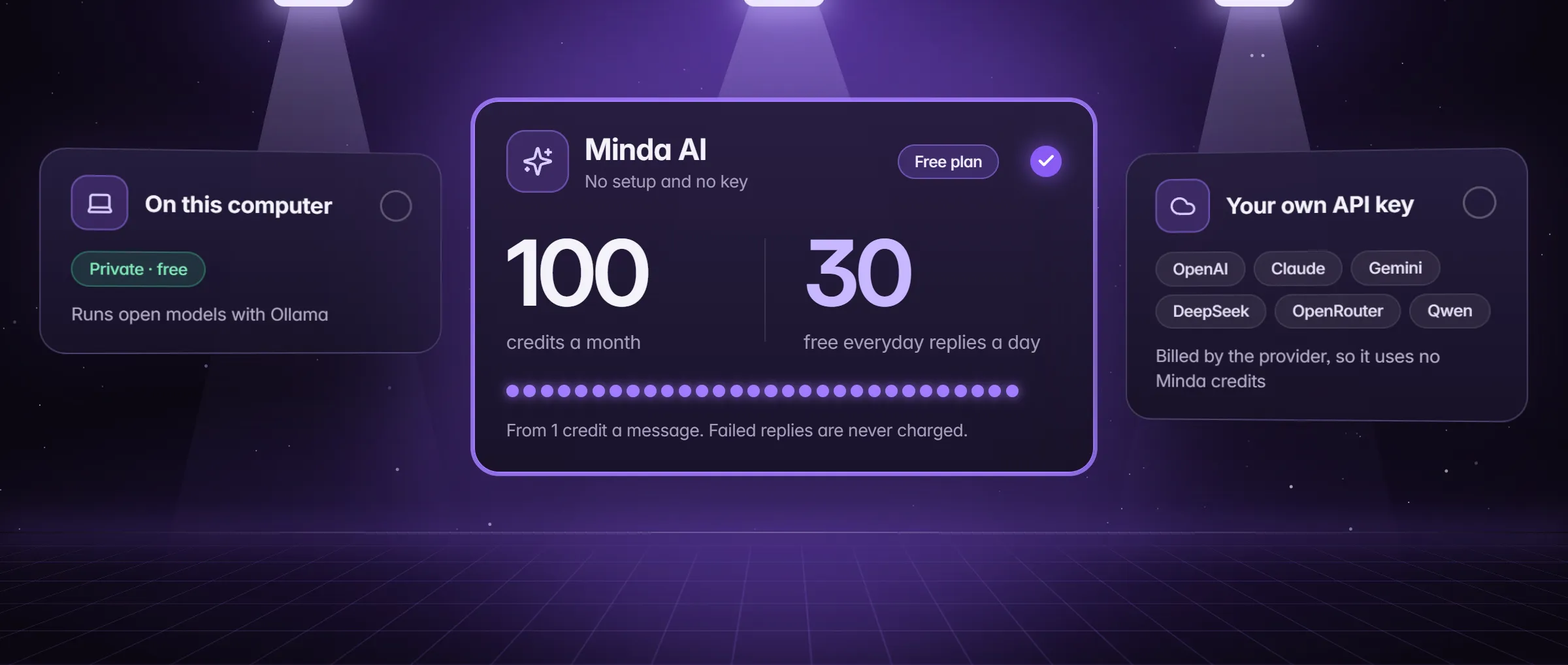
- Your own AI keys. An OpenAI, Anthropic, Google Gemini, DeepSeek, OpenRouter or Alibaba Qwen key in Settings → AI gives unlimited chat and SI agent turns with no credits; that provider bills you. Bring your own API key walks through it.
- Ollama on your computer. A local model costs nothing, and with Keep SI on this computer it is the only model Minda uses. Run SI on your computer covers the set-up.
- Free everyday replies. Short questions on the everyday models cost no credits, 30 a day on Free, and they still answer after the month’s credits are spent.
- Scrapes, rules and reminders. A scrape task that sends new rows, a rule that watches a page and notifies you, and "remind me at 3:30 pm to call the dentist" run with no model.
- Page tools. Extract a page’s table to Excel or CSV, auto-correct as you type, save a page as a PDF, open PDF and Office files in a tab: none of them calls a model.
- The built-in browser. Tabs, vertical tabs, split view up to a 4-pane grid, the password manager and the one-click move from Chrome, Edge or Firefox.
What do the 100 credits a month pay for?
Minda AI credits pay for requests to Minda’s hosted models, the AI that works with no set-up and no key of your own. A standard message costs from 1 credit; a premium model costs more, and the model menu shows each model’s price in credits before you pick it. Pictures, voice and video are priced by size and length, and failed or empty replies are never charged.
On Free, the 100 credits pay for what you run on Minda’s hosted models: the SI agent’s turns, deep research, the People search for a new person’s accounts, pictures and the voice assistant’s clips. Each step the agent takes is one request, so a long agent task is where credits go fastest. How Minda AI credits work lists what spends them and what never does.
What happens when the free credits run out?
Only what runs on Minda AI’s credits pauses; everything else keeps working. While you chat on a Minda AI model, a line over the chat box tells you once 90% of the month’s credits are used, with the day they reset. When none are left it says so, with the date they come back, Upgrade and Buy credits. Until that date, four ways keep you going:
- Short questions: the free everyday replies still answer, 30 a day on Free.
- Your own key or Ollama: switch the chat’s model in the menu next to Send; no credits, no daily limit.
- A credit pack: packs never expire, are used after the month’s included credits, and any signed-in account on any plan can buy one.
- More each month: Pro or Max, from Settings → Account or the pricing page.
Free, Pro or Max: what differs?
What changes from plan to plan is how much hosted AI and cloud work it includes. Call lists, which dial your leads one by one and log each call, are the one function sold on its own: the Minda Calls add-on, which Max includes and the other plans can add, with the first calls free.
| Included | Free | Pro | Max |
|---|---|---|---|
| Minda AI credits a month | 100 | 2,000 | 6,000 |
| Free everyday replies a day | 30 | 100 | 200 |
| Social profiles you follow | 10 | 2,000 | 2,000 |
| Cloud automations turned on at once | 20 | 50 | 50 |
| Largest file Minda Files opens on the web | 50 MB | 256 MB | 256 MB |
| Call lists (Minda Calls) | Add-on | Add-on | Included |
Are there other ways to add credits on Free?
- Daily check-in and invites. Opening Minda on days in a row adds Minda AI credits to the month, with bonuses at 7 and 30 days, and a friend who joins with your invite link gets credits, and so do you.
- The default-browser bonus. +100 Minda AI credits a month on any plan while Minda is your default browser; the app reports it, and it is capped.
- Access credits. +1,000 Minda AI credits a month on any plan, Free included, for people with disabilities, on their own word: one tick, with no proof asked for or kept.
- The student offer. Pro at a student price for 12 months for a student who proves a school email address with a six-digit code mailed to it, checked again every year; the pricing page has its terms.
- A team. Joining a team is free, and a team that buys seats gives every member Pro, with 14 days free and no card to start.
Limits
- Credits pay only for Minda’s hosted models, and 100 a month go quickly on long SI agent tasks: heavy agent work belongs on your own keys, Ollama, a pack or Pro.
- Schedules, scrapes and rules run only while Minda is open on that computer; cloud automations run while it is off, but on public pages and APIs only.
- Free follows 10 social profiles, keeps 20 cloud automations turned on at once, and opens files up to 50 MB in Minda Files on the web.
- The pricing page has the final word: the account server’s catalog can change list prices, and the default-browser bonus is capped.
Questions
Is there a free AI browser?
Minda Super Intelligence has a Free plan that is not a trial: the personal AI agent app for your computer, with a built-in browser and every function, the SI agent included. It comes with 100 Minda AI credits a month and 30 free everyday replies a day, and your own AI keys or Ollama cost no credits.
What happens when my free credits run out?
Only Minda AI’s paid requests pause, until the date the chat shows. Short questions still get free everyday replies, your own keys and Ollama keep working, and a credit pack, which never expires, or Pro adds more.
Do I need a card for the Pro trial?
No. Pro has a 7-day trial on a first subscription with no card. Paid plans can be cancelled at any time and keep working to the end of the period paid for; Stripe handles billing, and Minda never sees the card.
Can I use my own API key on the Free plan?
Yes, on every plan. Paste an OpenAI, Anthropic, Gemini, DeepSeek, OpenRouter or Qwen key in Settings → AI, or run Ollama on your computer: chat and SI agent turns then cost no credits and have no daily limit, and the provider bills you.
Is Minda a browser?
No. Minda Super Intelligence is the personal AI agent app for your computer. It has a built-in Chromium browser, so the SI agent works in the web pages and accounts you use, but the app is the agent, not a browser with a chat box.
Sources
- minda-facts.json: plans (Free, Pro and Max)
docs/marketing/minda-facts.json#plans - minda-facts.json: offers
docs/marketing/minda-facts.json#offers - minda-facts.json: creditPacks
docs/marketing/minda-facts.json#creditPacks - minda-facts.json: teamSeat
docs/marketing/minda-facts.json#teamSeat - minda-facts.json: minda-ai
docs/marketing/minda-facts.json#minda-ai - minda-facts.json: ai-chat-own-keys
docs/marketing/minda-facts.json#ai-chat-own-keys - minda-facts.json: ai-agent
docs/marketing/minda-facts.json#ai-agent - minda-facts.json: scheduled-tasks
docs/marketing/minda-facts.json#scheduled-tasks - minda-facts.json: workspaces
docs/marketing/minda-facts.json#workspaces - minda-facts.json: deep-research
docs/marketing/minda-facts.json#deep-research - minda-facts.json: notes-and-knowledge
docs/marketing/minda-facts.json#notes-and-knowledge - minda-facts.json: page-tools
docs/marketing/minda-facts.json#page-tools - minda-facts.json: jarvis (the Minda voice assistant)
docs/marketing/minda-facts.json#jarvis - minda-facts.json: private-ai
docs/marketing/minda-facts.json#private-ai - minda-facts.json: hide-my-ip
docs/marketing/minda-facts.json#hide-my-ip - minda-facts.json: sync
docs/marketing/minda-facts.json#sync - minda-facts.json: notifications
docs/marketing/minda-facts.json#notifications - plans.ts: PLANS, EVERY_PLAN, PLAN_ROWS, CALLS_ADDON and DEFAULT_BROWSER_BONUS
src/shared/plans.ts - A free everyday reply is held before any credits
server/src/modules/ai/chat.ts - The credits line over the chat box, and a task’s credit budget (Key Design Decision 52)
docs/project-knowledge.md