Why are people looking for an Arc alternative?
Because Arc is maintained but no longer developed as it was. In a letter to Arc members in May 2025, The Browser Company said it is not actively developing Arc’s core experience the way it used to, while it keeps maintaining Arc, and Arc’s home page calls Dia the next evolution of Arc. Arc itself runs on Windows and macOS (its FAQ says Linux is not supported) and is built on Chromium, the engine of Chrome and Edge.
So the useful question is less "what looks like Arc" than "what keeps what I liked, and adds what I need now". This page answers it for Minda Super Intelligence, which is not a browser but the personal AI agent app for your computer, with a built-in Chromium browser that its SI agent works in. Every Arc fact here was read on Arc’s own pages on 2026-10-18, and AI browsers compared sets Arc beside Minda function by function.
What maps to what?
Arc’s column is what its own pages say; Minda’s column is from Minda’s facts file. Where one side has nothing to match, the note says so, and three rows go to Arc.
| What you used in Arc | Where it is in Minda | Note |
|---|---|---|
| Spaces and Profiles, to keep work, study and hobbies apart in one window | Workspaces, each with its own cookies and sign-ins, unlimited on every plan, on a left rail with your pinned apps | Minda keeps two accounts of one site signed in at once; Arc’s pages do not say whether that works |
| Shift over a link for a preview of its page (Arc Max) | Drag a link and let go: its page opens in a card over yours, with the same sign-ins | Both show a linked page before you open it |
| ChatGPT from the Command Bar (Arc Max, with a ChatGPT account) | The SI chat on Minda’s hosted models, your own AI keys or Ollama on your computer; 2 or 3 models side by side on one question | Arc’s pages name no choice of model |
| Every extension Chrome supports, its FAQ says | Many Chrome extensions work, not every one | Arc’s edge |
| uBlock Origin installed for you, which you can remove | A built-in ad blocker with a per-site panel | Minda also rejects cookie pop-ups when you turn that on |
| Arc Search, a separate browser for iOS and Android | The account page on your phone: the inbox, tasks, notes and bookmarks of your computers | Arc’s edge: Minda has no phone browser |
| Public downloads for Windows and macOS | Coming soon for Windows 10 and 11 (64-bit); macOS and Linux builds not published yet | Arc’s edge today |
| A privacy promise: it does not know which sites you visit or what you type, and does not sell your data | A published audit of what leaves your computer, feature by feature, and a switch that keeps the SI on it | Read both before you move |
| Its desktop pages describe no agent that acts on pages and no scheduled tasks | An SI agent that clicks, types and fills forms; unlimited schedules and automations on every plan | Minda’s edge |
How do Arc’s Spaces become workspaces?
A workspace in Minda keeps its own cookies and sign-ins, apart from the others, and you can have as many as you like on every plan. If you used Spaces to split work from home, make a workspace for each; if you used them for clients, make one per client, and each stays signed in to its own accounts, even two accounts of the same site at once. Workspaces sit on the left rail with your pinned apps, and a private window keeps its cookies in memory only.
The difference that matters most is the SI agent. It works in whichever workspace you name ("in the Client B workspace"), with that workspace’s sign-ins and out of your sight, and "every account" sends helpers into each workspace side by side. Only your own words pick a workspace, never text on a web page, and a schedule or a saved agent keeps the workspace it was made in. Two accounts of one site at once walks through the set-up, and separate workspaces has the feature page.
How do I bring my Arc data over?
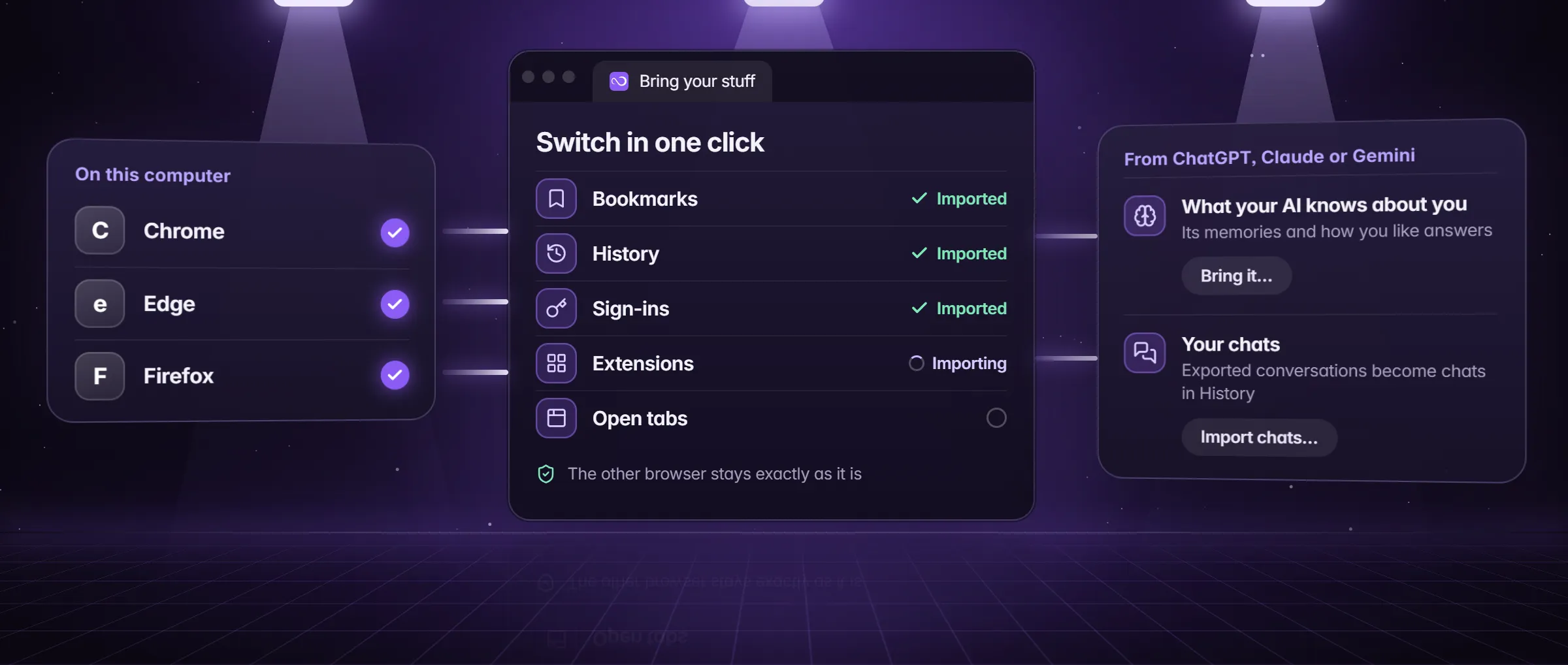
- Open Settings → Import & export → Import from another browser; on the first run, the Bring your stuff step offers the same import.
- Pick Arc and its profile. Minda finds Arc in its app folder on Windows and in its usual folder on macOS, and proposes the profiles used in the last 30 days.
- Tick what to bring: bookmarks, history, passwords, sign-ins to sites (cookies), extensions and open tabs.
- Press Import. Each kind reports what came over, what was skipped and why; Stop ends it, and Try again repeats only the kinds that need it.
- If some passwords stay behind, the result says how many and offers Use a passwords file: a CSV export from the browser, which Minda saves encrypted and then offers to delete for good.
- Keep Arc installed until you are sure: the import reads copies of Arc’s files and removes nothing from Arc.
What does Arc do that Minda does not?
Three things, stated plainly, so you can decide with them in view.
- Every Chrome extension. Arc’s FAQ says it supports every extension Chrome supports. In Minda many Chrome extensions work, not every one, so test the few you rely on in your first hour.
- A phone browser. Arc Search is a separate browser for iOS and Android, and its Browse for Me searches, reads pages and writes you an answer page. Minda on your phone is the account page, with the inbox, tasks, notes and bookmarks of your computers; it is not a phone browser, and there is no Minda phone app to install.
- Public downloads. Arc has public downloads for Windows and macOS. Minda Super Intelligence for Windows 10 and 11 (64-bit) is coming soon; macOS and Linux builds are not published yet.
What does Minda add that Arc’s pages do not list?
- An SI agent that acts. It opens pages, clicks, types and fills forms in your own signed-in accounts, in hidden tabs, and stops for your OK before anything that pays (Ask before paying, on by default). Arc’s desktop pages describe no agent that acts on pages.
- Schedules and automations. Unlimited scheduled tasks, scrapes and rules on every plan, and cloud automations that run while your computer is off, 20 turned on at once on Free. Arc’s pages list no scheduled tasks.
- Any AI model. Minda’s hosted models on credits, your own OpenAI, Claude, Gemini, DeepSeek, OpenRouter or Qwen key, or Ollama on your computer at no credits; Keep SI on this computer refuses every cloud provider before anything is sent.
- Split view and vertical tabs. Vertical tabs, tab groups and split view up to a four-pane grid on every plan, with Memory Saver for idle tabs and every window back as it was after a restart.
- Several accounts of one site at once. One workspace per account, all signed in side by side, and the agent works in the one you name.
Arc, Dia or Minda: which fits what you do?
Stay on Arc if it does what you need and a browser that is maintained rather than developed suits you. Look at Dia if you want The Browser Company’s next browser; Minda vs Dia sets the two side by side, each fact sourced and dated. Choose Minda Super Intelligence if what you want is an agent that does the work in your own accounts, with workspaces that keep each account apart.
Minda is free to start: the Free plan has every function, the SI agent on pages included, with 100 Minda AI credits a month and 30 free everyday replies a day, and your own AI keys or Ollama cost no credits. Pro differs by credits, never by functions; pricing has the table.
Limits
- Many Chrome extensions work in Minda, not every one; Arc’s FAQ says it supports every extension Chrome supports.
- The import reads Arc on Windows and macOS but was checked against a made-up Arc profile, not a real install; passwords and sign-ins a browser locks to itself stay behind, and at most the 10,000 most recent history pages come over.
- Minda Super Intelligence for Windows 10 and 11 (64-bit) is coming soon; macOS and Linux builds are not published yet, and there is no phone browser.
- The Arc facts are as read on Arc’s own pages on 2026-10-18; Arc may change them.
Questions
Is there an Arc alternative for Windows?
Minda Super Intelligence is built for Windows first: Windows 10 and 11 (64-bit) are coming soon, and macOS and Linux builds are not published yet. It maps Arc’s Spaces to workspaces with separate sign-ins and adds an SI agent that acts on pages. Arc itself also runs on Windows, its FAQ says.
Can I import my Arc data?
Yes. Settings → Import & export → Import from another browser lists Arc on Windows and macOS and brings bookmarks, history, passwords, sign-ins, extensions and open tabs. Passwords a browser locks to itself stay behind, at most 10,000 history pages come over, and nothing is removed from Arc.
Does Minda have split screen?
Yes, on every plan: split view with two panes or a four-pane grid, vertical tabs and tab groups, and Memory Saver for tabs you are not using. Drag a link and let go to preview its page in a card over yours, with the same sign-ins.
Is Arc being shut down?
Not according to its maker. In a May 2025 letter to Arc members, The Browser Company said it keeps maintaining Arc but no longer develops its core experience as it did, and Arc’s home page calls Dia the next evolution of Arc.
Is Minda free?
Yes, to start. The Free plan has every function, the SI agent included, with 100 Minda AI credits a month and 30 free everyday replies a day; your own AI keys or Ollama cost no credits. Pro differs by credits, never by functions.
Sources
- minda-facts.json: workspaces
docs/marketing/minda-facts.json#workspaces - minda-facts.json: tabs-and-split
docs/marketing/minda-facts.json#tabs-and-split - minda-facts.json: import
docs/marketing/minda-facts.json#import - minda-facts.json: ai-agent
docs/marketing/minda-facts.json#ai-agent - minda-facts.json: ai-chat-own-keys
docs/marketing/minda-facts.json#ai-chat-own-keys - minda-facts.json: ad-blocker-and-protection
docs/marketing/minda-facts.json#ad-blocker-and-protection - minda-facts.json: extensions-passwords-backups
docs/marketing/minda-facts.json#extensions-passwords-backups - minda-facts.json: scheduled-tasks and automations
docs/marketing/minda-facts.json#scheduled-tasks - minda-facts.json: plans and platforms
docs/marketing/minda-facts.json#plans - Arc in the import: its Windows app folder and its macOS folder
src/main/services/data/browser-import.ts - Link preview: a dragged link opens in a card, with the same sign-ins
src/main/tab-manager.ts - Import from other browsers (a synthetic Arc profile) and Known Bug 75
docs/project-knowledge.md - Arc’s facts as read for AI browsers compared, and the site’s download line
tools/website/hub/data/browsers.mjs - Arc home page, read
- Arc Max, read
- Arc FAQ, read
- Arc security, read
- Arc for iOS and Android: Arc Search, read
- The Browser Company: a letter to Arc members, 2025, read