What is a headless browser?
A headless browser is a web browser that runs with no visible window: a program starts it, tells it which address to load, and reads the page back as text, a screenshot or a file. It is the same kind of software you browse with, minus the screen and the buttons.
The word "headless" means no head, no window. Tools such as Puppeteer, Playwright and Selenium start and drive one from code. Developers use them for tests, for screenshots and for reading many pages in a row, usually on a server with nobody watching. This definition is general knowledge about browsers, not a Minda fact; what the page says about Minda is checked against the app.
How does a headless browser work?
Four steps, always the same, whatever tool drives it.
- Code starts it. A script launches the browser with its window switched off and, usually, a fresh profile: no history, no cookies, no sign-ins, no saved passwords.
- Code gives the orders. Open this address, wait for that element, click it, type here, take a screenshot.
- Code reads the result. The page’s text, the number of elements that match, a picture, a downloaded file.
- It ends when the script ends. The profile goes with it, unless the script saves one.
An example: testing a checkout behind a login for a Boston shop
Priya Raman builds the web shop of a Boston shoe store. Its staging site, staging.shoes.example, needs a customer login to reach the checkout, and she wants to know that the checkout shows an error when the zip code is missing. The shop and the people in this example are made up.
- For the nightly test she uses a headless browser. Her script starts a fresh browser, opens the login page, types the test account’s email and password, waits for the account page, opens the cart, presses Place order and reads the error. It runs the same way every night on a build server, which is what a test suite needs.
- This afternoon she wants only a quick look at a bug a colleague saw in a real session, with a cart already full. A script would have to rebuild that state first.
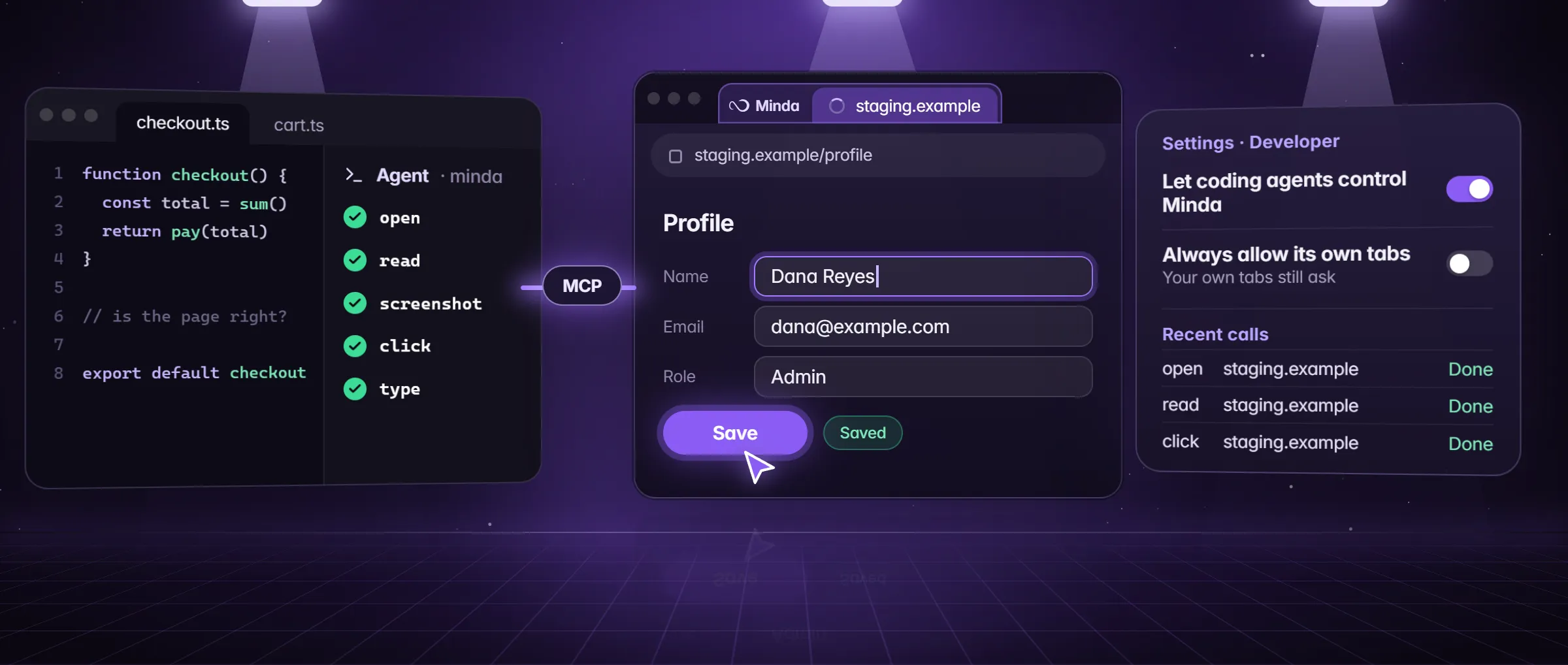
- She signs in once in Minda, in a Staging workspace, and keeps that workspace active, because the agent’s tabs open in the active one. Then she tells Claude Code: "Use the minda tools. Open the cart on our staging site, snapshot it, click Place order, take a screenshot and tell me the error on the page."
- Minda asks for her OK before the first click. The agent opens the page in her signed-in session, in a tab she does not have to look at, clicks, takes the screenshot and reports: "Zip code is required."
- The script stays in the build and the real browser handled the one-off look. Neither replaced the other.
What can you use a headless browser for?
- Automated tests. The same clicks through a sign-up or a checkout, every night, on a server.
- Screenshots and PDFs. A picture of a public page at a set size, taken the same way every time.
- Reading many pages. A script that loads thousands of pages and keeps one field from each.
- Pages that build themselves in the browser. The text is there only after the page’s own scripts run, so a plain download of it is empty; any browser, headless or not, runs them.
- Build servers and other places with no screen. A headless browser needs none.
How to use a real browser over MCP in Minda
- In Minda, open Settings → Developer and turn on Let coding agents control Minda. It is off until you do, and it listens on this computer only.
- Under Connect an agent, pick your editor or coding agent (Claude Code, Codex, Cursor, VS Code, Antigravity and more) and copy its command or config. It needs Node.js 18 or later.
- Paste it into the tool’s MCP settings, once. The tool then starts Minda’s MCP server by itself.
- Ask the coding agent for a first task: "Use the minda tools: open this page and take a screenshot."
- Allow each click and typed word when Minda asks, or turn on Always allow its own tabs. The agent then acts without asking in the tabs it opened, while your own tabs, your history and a press that pays still ask.
Where does a headless browser fall short?
Four places, and each is where a real browser, the one you already use, has the advantage.
- Sign-ins. A fresh profile has none of yours, so the script has to log in itself, and a login with a code or a second step is hard to script. A real browser you are signed in to starts on the page you see, in the workspace you pick.
- Bot checks. Some sites show a check to a browser that a program drives, and a page behind a check shows no content. A real browser may meet fewer of them, but it can still meet one: a CAPTCHA is yours to pass, and Minda does not go around it.
- Extensions and settings. A fresh profile has none of your extensions, saved passwords or site settings, so a page can behave differently from the one you use.
- Seeing it. Nobody watches a headless run, so a failure is a log line or a screenshot afterwards. In Minda the agent’s tabs open in your window, and each click can ask first.
Headless browser or a real one: which for which task?
Neither is better in general. The table says which fits which job, including where the real browser in Minda does not.
| Task | A headless browser | A real browser over MCP in Minda |
|---|---|---|
| A nightly test in a build server | Fits: it starts fresh anywhere | Not for this: it runs only on a computer where Minda is open |
| A page behind your own login, today | The script must log in first | Fits: your sign-ins are already there, one workspace each |
| A quick look at a bug in your real state | Rebuild the state in code first | Fits |
| Thousands of pages in a row | Fits: scripted, nobody watching | Not for this: built for a task you can watch |
| A screenshot of a public page at a set size | Fits | Works for the visible part of one page at a time |
Limits
- The bridge is off by default, listens on 127.0.0.1 only with a token, refuses a request that carries an Origin header, and never reaches private windows.
- It runs only while Minda is open on this computer: there is no cloud bridge, and a CI job still needs a headless browser of its own.
- Each click and typed word asks first unless Always allow its own tabs is on; even then your own tabs, your history and a press that pays still ask.
- What a coding agent reads it may pass on to its own AI provider: the pages its task opens, their text and screenshots.
Questions
What does headless mean in a browser?
It means the browser runs with no window, started and driven by a program. It loads pages and runs their scripts like any browser, and reports back as text, pictures or files. Tools such as Puppeteer, Playwright and Selenium drive them.
Is a headless browser the same as a scraper?
No. A headless browser is the engine that loads and runs a page; a scraper is the job of copying data from it. A scraper can use a headless browser, or read a real one, as Minda’s scrape tasks do in a hidden page of your workspace.
Can a coding agent use my signed-in browser?
Yes, in Minda: turn on Let coding agents control Minda in Settings → Developer and add the MCP server to your tool. The agent works in tabs of your real browser, with your sign-ins, on this computer only, and each click asks first unless you allow its own tabs.
Which plan has the developer bridge?
Every plan: open, read, screenshot, click and type. The coding agent brings its own AI model, and the bridge offers the browser.
Sources
- minda-facts.json: developer-bridge
docs/marketing/minda-facts.json#developer-bridge - minda-facts.json: workspaces
docs/marketing/minda-facts.json#workspaces - The editors Settings → Developer has a command for
src/shared/coding-agents.ts - Settings → Developer: the switches and the snippets
src/renderer/components/pages/settings/DeveloperSection.tsx - Minda’s MCP server: how each tool connects
tools/minda-mcp/minda-mcp.mjs - What Minda keeps and sends: the coding agents row
docs/privacy.md