What is an LLM?
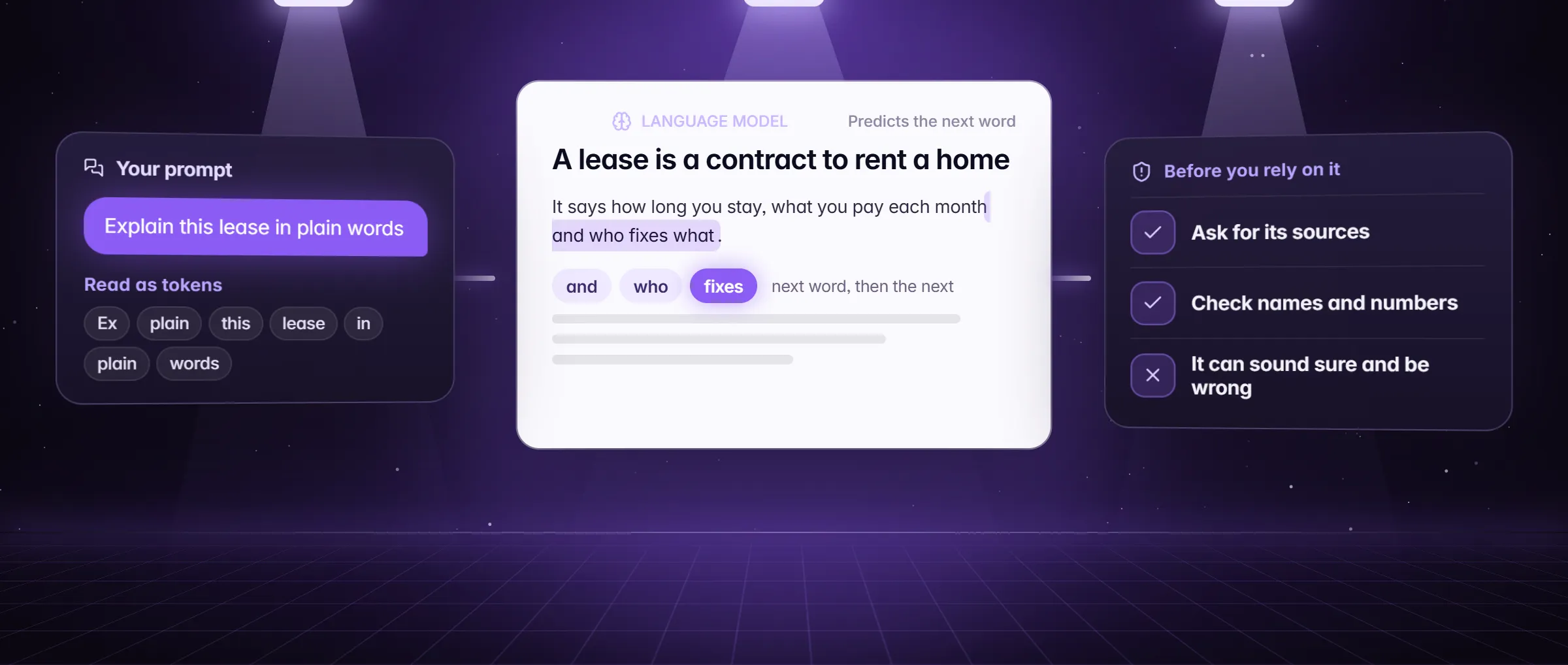
An LLM, short for large language model, is a computer program trained on a very large amount of text to predict which words come next, and that one skill lets it answer questions, write, summarize, translate and explain. "Large" describes the amount of text it learned from and the size of the model; "language" is what it works with. ChatGPT, Claude, Gemini and DeepSeek are chats built on LLMs.
A model and a chat are different things. The model is the program; the chat is the window you talk to it in. AI is the whole field, and an LLM is one kind of AI model, the kind built around language; some also read pictures. In Minda Super Intelligence, the personal AI agent app for your computer, one chat can use several models, so you pick the model per question.
How does an LLM work?
An LLM works by predicting one small piece of text at a time. Your words are cut into pieces called tokens; the model scores which token is most likely to come next, given everything it was shown, adds that one, and repeats until the answer is done. What it "knows" is patterns from the text it was trained on, not a list of facts it can look up.
- It reads what you give it. A request is your question, the chat so far and anything you add: a page, a file, a note, a picture. That bundle is all the model sees of your work, and the AI activity log (Settings → AI → Privacy → AI activity) lists each request’s provider, model, host, character counts and page titles, never the words.
- It writes from patterns. It does not search the web or open a page unless a tool does that for it. The SI agent and deep research are an LLM plus tools that open and read pages for it.
- It can be wrong with confidence. Because it predicts likely words, a missing fact can come out as a plausible guess. That is called a hallucination, and what is an AI hallucination explains how to catch one.
An example: three models, one lease clause
Marcus owns two rental houses in Denver. A tenant asks what "normal wear and tear" means in the deposit clause of the lease, and Marcus wants to answer in plain words before he decides anything.
- He opens the SI chat in Minda with Alt+Q and pastes the clause.
- He opens the model menu, chooses Compare models and ticks three models. Each question now goes to all three, so it uses three times the requests.
- He asks: "Explain this clause to a tenant in three sentences, with two examples of wear and tear and two of damage."
- The three answers appear side by side. One is the plainest, one hedges more, and one invents a rule that is not in the clause. He keeps the plain one and drops the invented one.
- He checks the plain answer against the clause, and because a lease is a legal document he asks his lawyer before he sends anything that changes it. The model’s job was a first draft of an explanation, not legal advice.
What can you use an LLM for?
- Draft: an email, a reply, a post or a first version of anything you will edit.
- Summarize: a long page, a thread or a report, down to the few lines you need.
- Explain: a clause, a paragraph of code or a hard idea, at the level you ask for.
- Rewrite and translate: change the tone, shorten, fix grammar, or move text between languages.
- Extract and sort: pull names, dates or prices out of text into a list or a table.
- Act, with tools: the SI agent is an LLM that is also allowed to open pages, click, type and fill forms. What is an AI agent explains how that differs from a chat.
How to pick and use a model in Minda
- Press Alt+Q to open the SI chat, then open the model menu in the chat box. It shows the model in use, or Add a model when none is ready.
- Read the price at the end of each row. Minda AI models show their credits a message, and the groups for your own key or Ollama are marked "your key" or "free" instead. A standard message costs from 1 credit, and a premium model costs more.
- Pick an everyday model for short questions and drafts, and keep a premium model for a long task or a hard question.
- Not sure which fits? Choose Compare models and tick 2 or 3. Each question goes to every model you picked, the replies show side by side, and you keep the one you like.
- Give the model something real to read: type @tabs, @bookmarks or @history, or add a note or a file, so it works from text instead of memory.
- Start a New chat for each new topic, so earlier questions do not ride along with every request.
Standard, premium, local: what the labels mean
Each model in the menu carries one of four labels, and the label says where it runs and who bills you.
| Label | Where it runs | What it costs |
|---|---|---|
| Standard (everyday) | Minda AI: Minda’s server, then the model’s vendor | From 1 credit a message; short everyday replies are free each day, 30 on Free and 100 on Pro |
| Premium | Minda AI, on a larger model | More credits a message; the price shows before you pick it |
| Your own key | The provider you chose: OpenAI, Anthropic, Google, DeepSeek, OpenRouter or Alibaba Cloud | No Minda credits; that provider bills you |
| Ollama (local) | On your computer | No credits; the request stays on the computer |
What can an LLM not do?
An LLM is not a search engine, a database or a person who checked the answer. Four limits matter every day.
- It does not look facts up. Without a page or a tool it answers from patterns, so a date, a number or a citation can be invented. Give it the page, or use deep research, which cites only the pages it read.
- It does not know today. What it learned stops at a date, and it knows nothing newer unless a page or a tool brings it in.
- It does not remember like you do. A chat holds only what fits in the model’s window, and tokens, credits and context windows explains why a long chat drifts.
- It does not decide for you. It drafts and explains; checking a name, a number, a date or a link against its source stays yours.
Limits
- The general facts about LLMs on this page are general knowledge, not Minda facts; how any one model is built and trained differs by company.
- Minda names no hosted model and quotes no benchmark: the models are set by the operator and change, and each one’s price in credits shows in the chat before you pick it.
- A standard message costs from 1 credit and a premium model more; Compare multiplies the requests by the number of models; a request on your own key or Ollama uses no Minda credits.
Questions
What does LLM stand for?
Large language model: a program trained on a very large amount of text to predict the next words. The size is in the text it learned from and in the model itself; "language" is what it works with. ChatGPT, Claude, Gemini and DeepSeek are chats built on LLMs.
Is an LLM the same as AI?
No. AI is the whole field; an LLM is one kind of AI model, the kind built around language, and some LLMs also read pictures. A chat is the window you talk to a model in, and in Minda one chat can use several models.
Does an LLM look things up on the internet?
Not by itself: it answers from patterns in its training text and from what you give it. In Minda Super Intelligence the SI agent can open and read pages, and deep research cites only the pages it read, so the answer comes with a page you can check.
Can I use more than one model in Minda?
Yes. Use Minda AI’s hosted models on credits, a cloud provider on your own key (OpenAI, Claude, Gemini, DeepSeek, OpenRouter or Qwen), or Ollama on your computer, and use Compare to ask 2 or 3 at once and keep the answer you like.
What does a model see when I ask a question?
Your question, the chat so far, and the pages, files, notes and pictures you add; the SI agent also reads what its tools open. The AI activity log lists each request’s provider, model, host, character counts and page titles, never the words.
Sources
- minda-facts.json: minda-ai
docs/marketing/minda-facts.json#minda-ai - minda-facts.json: ai-chat-own-keys
docs/marketing/minda-facts.json#ai-chat-own-keys - minda-facts.json: private-ai
docs/marketing/minda-facts.json#private-ai - What a request sends and what the AI activity log keeps: sections 2 and 3
docs/privacy.md - The providers and the Compare limit of 2 or 3 models
src/shared/ai.ts